


If you are starting your journey in electronics, robotics, or IoT development, the Arduino Uno is one of the best development boards to begin with.
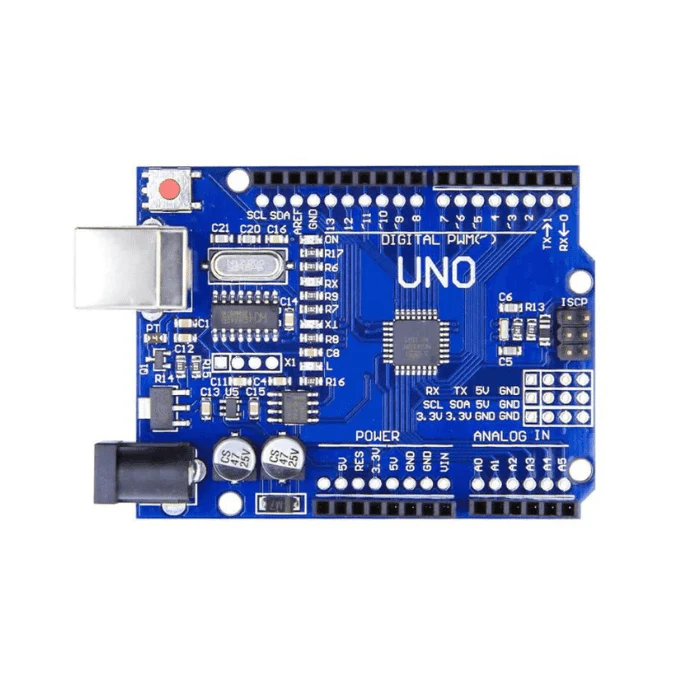
Arduino Uno is a microcontroller-based development board built around the ATmega328P microcontroller. It allows users to control electronic components such as sensors, motors, LEDs, and displays using simple programming.
Because of its simplicity, affordability, and strong community support, Arduino Uno has become the most widely used microcontroller board for beginners and hobbyists worldwide.
Whether you want to build a robot, smart home device, or an IoT system, Arduino Uno provides an excellent platform to turn your ideas into working projects.
What is Arduino Uno?
Arduino Uno is an open-source microcontroller board designed for building interactive electronic systems.
The board reads signals from input devices such as:
- Sensors
- Buttons
- Joysticks
Then processes the data and controls output devices like:
- LEDs
- Motors
- Relays
- Displays
This ability to sense, process, and control hardware makes Arduino Uno a powerful tool for building real-world electronics applications.
Arduino Uno Specifications
| Feature | Specification |
|---|---|
| Microcontroller | ATmega328P |
| Operating Voltage | 5V |
| Recommended Input Voltage | 7–12V |
| Digital I/O Pins | 14 |
| PWM Pins | 6 |
| Analog Input Pins | 6 |
| Flash Memory | 32 KB |
| SRAM | 2 KB |
| EEPROM | 1 KB |
| Clock Speed | 16 MHz |
| USB Interface | Type B |
These specifications make Arduino Uno suitable for small to medium embedded projects.
Arduino Uno Pinout Explained
Understanding the Arduino Uno pin configuration is important when connecting sensors and modules.
Digital Pins (0–13)
Arduino Uno contains 14 digital pins used for digital input and output operations.
Examples of digital operations:
- Turning an LED ON or OFF
- Reading button presses
- Controlling relays
Some digital pins support PWM (Pulse Width Modulation).
PWM pins are: 3, 5, 6, 9, 10, 11
These pins are commonly used for:
- Motor speed control
- LED brightness adjustment
- Servo motor control
Analog Pins (A0–A5)
Arduino Uno includes 6 analog input pins.
These pins read analog signals from sensors such as:
- Temperature sensors
- Light sensors
- Gas sensors
- Joystick modules
The Arduino converts analog signals to digital values using an Analog-to-Digital Converter (ADC).
Power Pins
Arduino Uno also includes several power pins used to supply voltage to external components.
| Pin | Function |
|---|---|
| 5V | Power supply for modules |
| 3.3V | Low-power devices |
| GND | Ground |
| VIN | External power input |
Programming Arduino Uno
Arduino boards are programmed using the Arduino IDE (Integrated Development Environment).
The programming language used is based on C and C++.
An Arduino program is called a Sketch.
Every Arduino sketch contains two main functions:
void setup() {
  // Runs once when the board starts
}

void loop() {
  // Runs repeatedly
}setup()initializes pins and hardwareloop()continuously runs the main program
Example Arduino Uno Project: LED Blink
The Blink LED project is usually the first program beginners try.
Components Required
- Arduino Uno
- LED
- 220Ω resistor
- Jumper wires
Circuit
Connect:
- LED positive → Pin 13
- LED negative → Resator → GND

Arduino Code
void setup() {
  pinMode(13, OUTPUT);
}

void loop() {
  digitalWrite(13, HIGH);
  delay(1000);

  digitalWrite(13, LOW);
  delay(1000);
}
Output
The LED will blink every 1 second continuously.
This project teaches the basics of digital output control using Arduino.
Advantages of Arduino Uno
There are many reasons why Arduino Uno is the most recommended board for beginners.
Easy to Learn
The Arduino IDE and programming structure are very beginner friendly.
Huge Community Support
Millions of developers and hobbyists share tutorials and projects online.
Low Cost
Arduino Uno boards are affordable and widely available.
Large Sensor Compatibility
Supports thousands of modules including:
- Ultrasonic sensors
- Temperature sensors
- LCD displays
- WiFi modules
Open Source Hardware
Both the hardware and software are open source, making Arduino highly customizable.
Popular Arduino Uno Projects
Arduino Uno is used in thousands of electronics projects.
Robotics Projects
- Line follower robot
- Obstacle avoiding robot
- RC cars
IoT Projects
- Smart home automation
- Weather monitoring system
- Smart irrigation system
DIY Electronics
- Temperature monitoring
- Motion detection alarms
- LED light controllers
Because of its flexibility, Arduino Uno can be used in education, research, and hobby electronics.
Arduino Uno vs Other Microcontroller Boards
| Board | Microcontroller | Best Use |
|---|---|---|
| Arduino Uno | ATmega328P | Beginner projects |
| Arduino Nano | ATmega328P | Compact devices |
| ESP32 | Dual-core MCU | IoT and WiFi projects |
| Arduino Mega | ATmega2560 | Large projects |
For IoT projects, boards like ESP32 are often used because they have built-in WiFi and Bluetooth.
However, Arduino Uno remains the best starting point for learning embedded systems.
Conclusion
Arduino Uno is one of the most powerful and beginner-friendly microcontroller boards available today. It provides a simple platform for learning electronics, programming, and embedded systems.
With its easy programming environment, wide hardware compatibility, and strong community support, Arduino Uno is an excellent choice for anyone interested in building electronics projects.
Whether you want to create robots, IoT devices, automation systems, or DIY gadgets, Arduino Uno is the perfect board to start your journey.